Google Workspace add-on

AbacusAI Assistant for Google Docs, Sheets & Slides

An agent in the sidebar of the file you already have open. Ask for a summary, a rewrite, a totals column, a chart, or a whole slide outline, and it reads the document and makes the edits in place.

Free to install. Works with your existing Abacus.AI account.

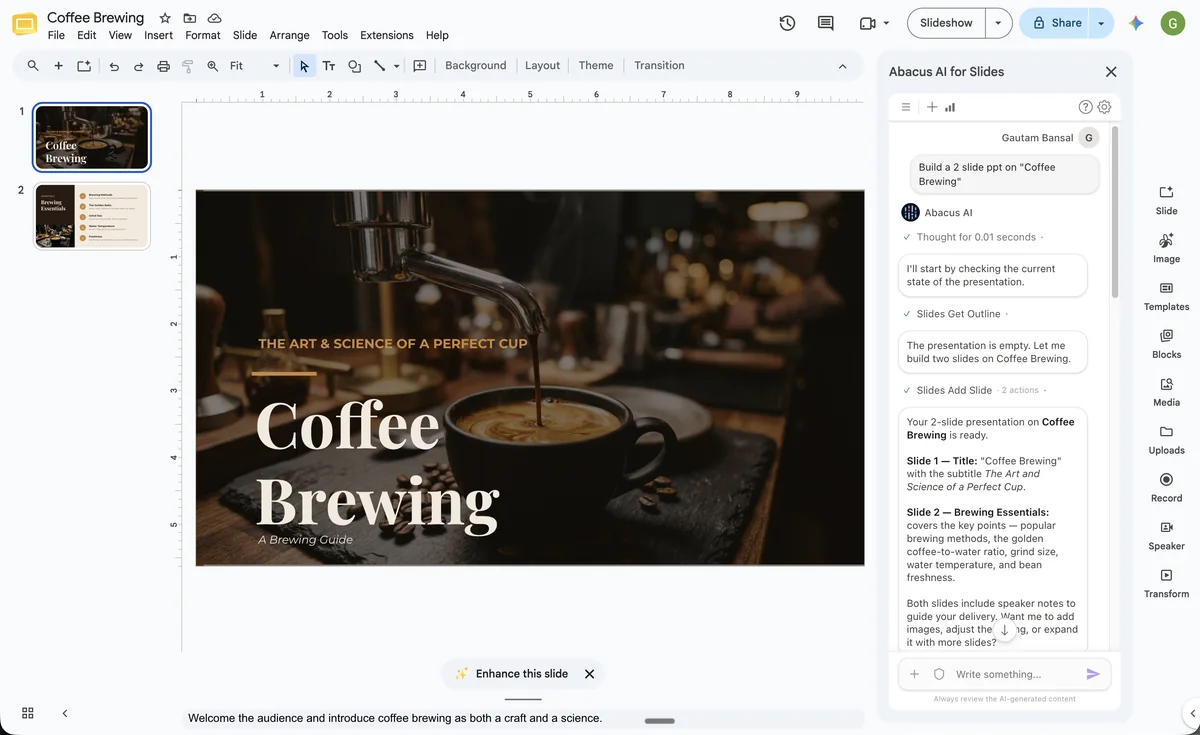
AbacusAI Assistant building a two-slide presentation on coffee brewing in Google Slides
Google Slides
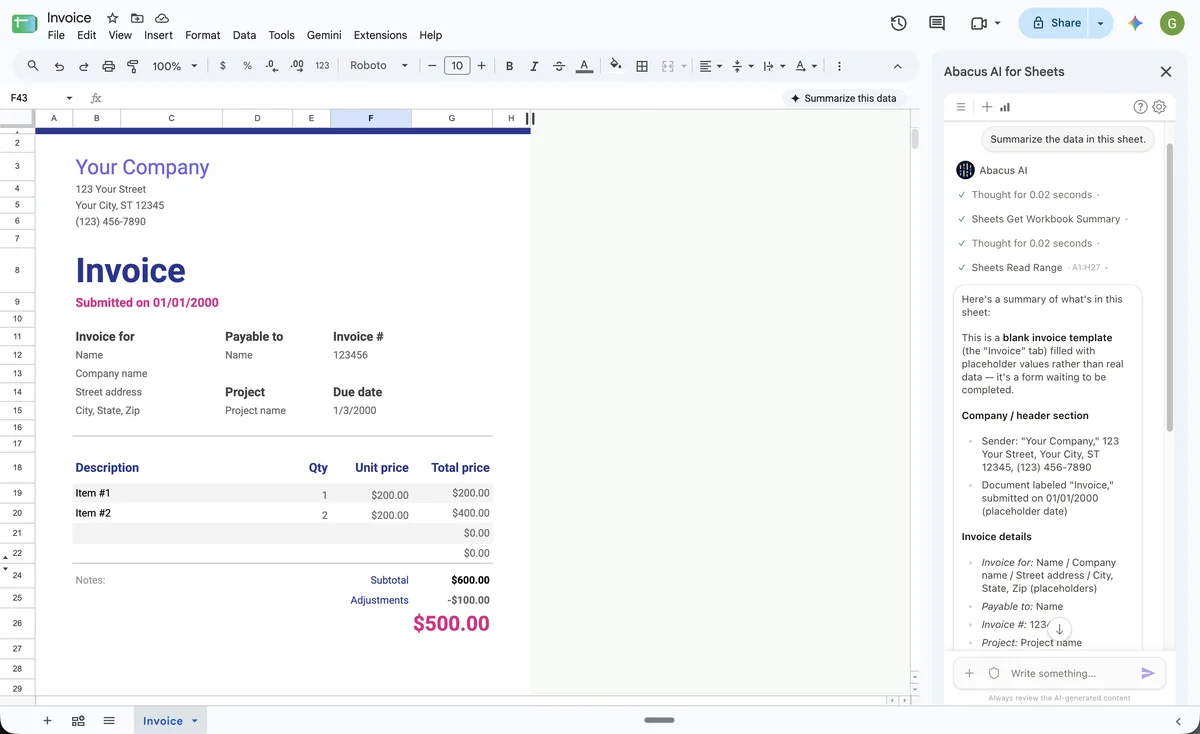
AbacusAI Assistant summarizing an invoice spreadsheet in Google Sheets
Google Sheets
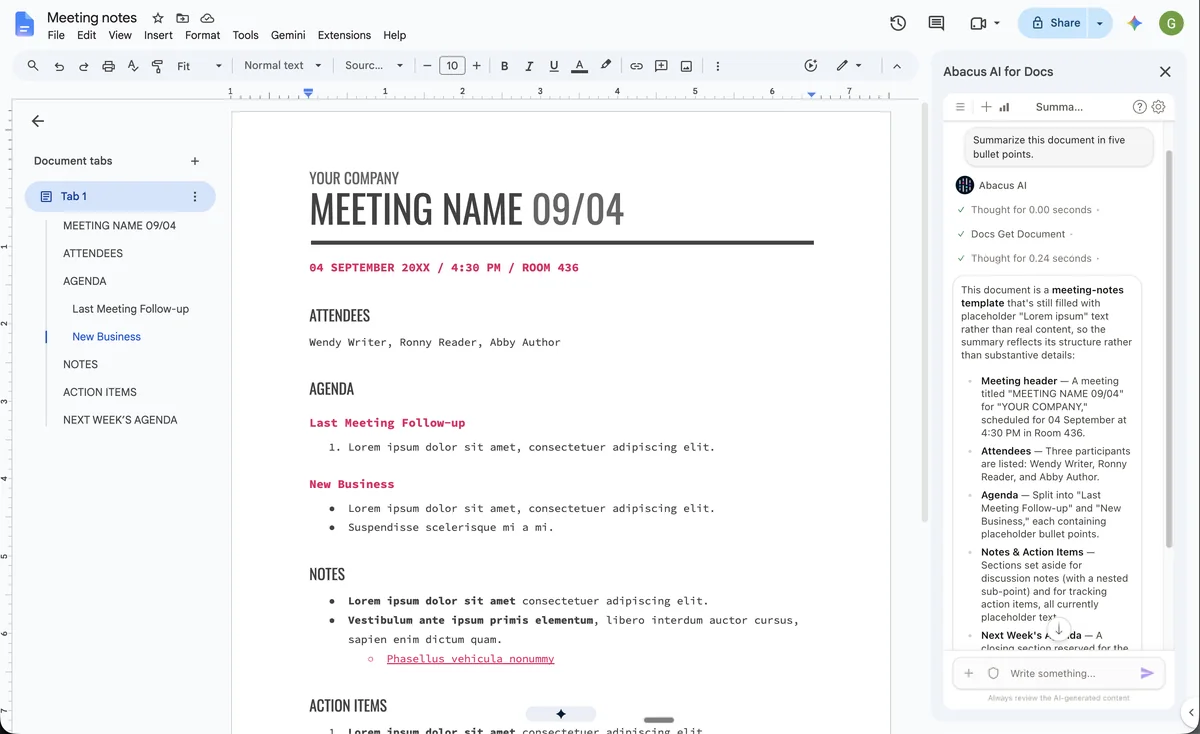
AbacusAI Assistant summarizing meeting notes in Google Docs
Google Docs

What it does

One assistant, three editors

Drafts, rewrites and summarizes

Grounded in the open document, not in copy and paste.

Formulas, tables and charts

Written straight into the sheet, with the narrative alongside.

Slides and speaker notes

Native, editable slides built from the layouts in your deck.

Asks before it removes

Destructive edits need your approval. Everything stays in version history.

Docs, Sheets and Slides

The same sidebar in every editor

Install once and it follows you into every file. It only ever sees the one you have open.

Google Docs

Draft, summarize and rewrite, in place

Ask for a five-bullet summary, a tighter paragraph, or a new section, and it lands exactly where it belongs.

  • Summaries of long documents in seconds
  • Rewrites in a different tone or length
  • Find and replace across the whole document
  • New sections, memos and meeting notes drafted in place
Google Sheets

Turn a sheet into the report

Point it at messy data and get formulas, totals, formatting and a chart, written directly into the spreadsheet.

  • Reads the real structure of your sheet first
  • Writes formulas and formats ranges directly
  • Builds charts and summary tables
  • Explains what it found in plain language
Google Slides

From a prompt to a deck

Ask for an outline on a topic and get real slides with titles, bullets and speaker notes, built from the layouts already in your deck.

  • New slides from your existing layouts
  • Speaker notes for every slide
  • Rewrites that keep your formatting
  • Iterate: "make slide 3 shorter"

Why it works

Built different where it matters

Not a chat window bolted onto the editor. An agent working in it.

Editable output

Everything it creates is native Docs, Sheets and Slides content you can restyle, retitle and update.

Only the open file

It cannot open, list or access any other file in your Google Drive. It works on what is in front of you.

Approval for risky edits

Actions that remove content ask first. Every change stays in the version history, so you can always undo.

Agentic research

When a task needs facts, it searches the web, cites sources and works in steps rather than guessing.

Setup

Install in under a minute

One install from the Google Workspace Marketplace covers Docs, Sheets and Slides.

Install from the Marketplace

Open the AbacusAI Assistant listing on the Google Workspace Marketplace and click Install. Google asks for the permissions once.

Open the sidebar

In any Doc, Sheet or Slides file go to Extensions › AbacusAI › Open.

Sign in and ask

Sign in with your Abacus.AI account using a one-time code, then describe what you need. Your Google email is pre-filled.

For Google Workspace admins

Deploy to everyone, or to specific organizational units and groups, from the Admin console. Users get the add-on in all three editors without installing anything themselves.

Admin deployment steps

Your data stays yours

Content from the open file is sent to Abacus.AI only when you submit a request, used solely to produce that response, and never used to train AI models.

How the add-on handles your data

Questions, answered

What is AbacusAI Assistant for Google Workspace?

An add-on that puts the Abacus.AI agent in a sidebar inside Google Docs, Google Sheets, and Google Slides. Describe what you need in plain language, and the assistant reads the file you have open and makes the edits for you: summaries, rewrites, formulas, tables, charts, new slides, speaker notes, and more.

How do I install it?

Install it once from the Google Workspace Marketplace. It then appears in all three editors under Extensions > AbacusAI > Open. Google asks for permission the first time you open it in each editor.

Do I need a separate account for the add-on?

No. The add-on uses your regular Abacus.AI account, the same one that works with ChatLLM. Sign in from the sidebar with a one-time code; if you don't have an account yet, you can create one in the same step.

Which permissions does it ask for, and why?

The add-on asks to view and manage the document, spreadsheet, or presentation it is installed in, so it can read the open file and apply the edits you request; to display its sidebar inside the editor; and to see your Google Account email address, which only pre-fills the sign-in form.

It cannot open, list, or access any other file in your Google Drive.

Are the edits applied directly to my file?

Yes. The assistant edits the open file in place, the same way a collaborator would, so everything it creates stays editable. Actions that remove content ask for your approval before they run, and every change is in the file's version history, so you can undo it.

All questions

Sign up to ChatLLM to proceed

Get more access to ChatLLM and unlock powerful AI Agent capabilities

Access to 100+ AI models including Fable 5.1, GPT 6 Astra and Seedream 2.0

Get Started
$10 $7
1st Month Discount First month then, $10/month
Models
100+ AI & Image Models
Vibe Code
Vibe Code Apps
General Purpose Agent
CLI + CoWork
CLI + CoWork
SuperComputer
SuperComputer
Learn more