Settings
The CLI, the VS Code extension and the Desktop app read the same settings files, so a change you make in one applies in the others. This page covers where settings live, how they combine, and what each one does.
Models, API keys and subscriptions have their own page. See Providers.
Where settings live
| Scope | Location | Applies to | Good for |
|---|---|---|---|
| User | ~/.abacusai/config.json | You, in every project on your machine | Your defaults: model, notifications, updates |
| Workspace | <project>/.abacusai/config.json | Everyone who opens that project | Team rules: permissions, timeouts, project providers. Commit it to share. |
| Settings file | Any JSON file passed with abacusai --settings <file> | One CLI session | CI jobs and scripts |
| Environment | ABACUS_* variables | The current shell or container | Quick overrides, CI |
| VS Code | abacusAgent.* in the VS Code settings editor | The extension only | Editor options such as panel position and inline diffs |
Both config.json files use the same keys. A key that is missing from one file inherits its value from the layer below.
When the agent creates the workspace config.json itself, for example to save an "always allow" answer, it also creates .abacusai/.gitignore listing config.json, so your answers stay out of commits. To share the file with your team, remove that line and commit the file.
Precedence
When the same setting is defined in more than one place, the higher layer wins:
- Environment variables
- CLI flags such as
--model - Files passed with
--settings - Workspace
config.json - User
config.json - Built-in defaults
Objects merge key by key, and a list replaces the one below it, with one deliberate exception. The permission rule lists (allow, ask, deny, autoModeInstructions) and additionalDirectories are unioned across the user and workspace files instead. A project's deny rule can therefore never be dropped by your user file, and your own allow rule never by a project file.
Permission lists used to replace each other like any other list, so rules had to be kept in a single scope. They are now merged, and deny still beats ask, which still beats allow, whichever file each rule came from.
One layer is also gated: a project you just cloned cannot widen its own permissions or start its own servers until you trust the folder. See Workspace trust.
Change a setting
In the CLI
Run /settings inside a session. Use Tab to switch between your user settings and the workspace settings.
| Key | Action |
|---|---|
↑ ↓ | Move between settings |
← → | Change a toggle or a choice |
Enter | Edit a number, or open a picker |
Tab | Switch between the user and workspace scope |
r | Reset the setting in this scope so it inherits again |
Esc | Close |
Each row shows where its value comes from: user, workspace, env, override (a --settings file or a CLI flag) or default. A value that comes from env or override cannot be edited here, because the file would not win. Each row also says when a change takes effect: immediately, on your next conversation, or after a restart.
In VS Code
Click the gear icon at the top of the Abacus AI panel. The settings page opens as an editor tab.
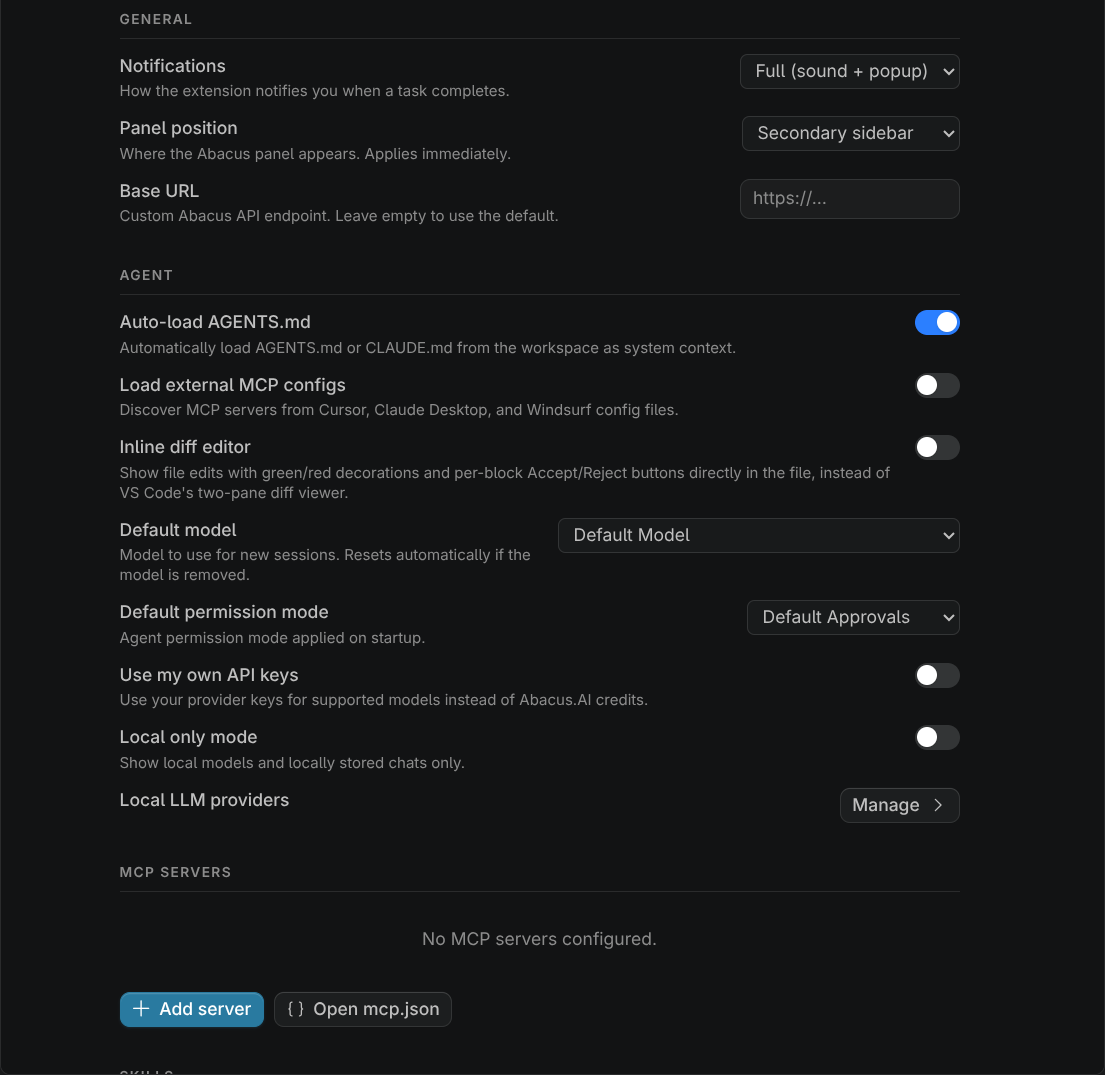
| Section | What you find there |
|---|---|
| Account | Who you are signed in as, your organization, this month's credit usage |
| General | Notifications, panel position |
| Agent | AGENTS.md loading, default model, default permission mode, use my own API keys, local only mode, and the link to Local LLM providers |
| MCP Servers | Add, edit and remove servers. See MCP configuration. |
| Skills | Installed skills and the marketplace. See Skills. |
Settings that the CLI shares are written to your user config.json, so the CLI picks them up too.
By hand
Open either config.json in an editor. It is plain JSON.
{
  "permissionMode": "ACCEPTEDITS",
  "notifications": "sound",
  "autoLoadAgentsMd": true,
  "permissions": {
    "allow": ["Bash(npm test *)", "Bash(git log *)"],
    "deny": ["Read(.env)"]
  }
}
To set a default model, pick it in /settings or in the extension rather than typing an id. The picker writes the right value for you.
Settings reference
All keys go in config.json. The CLI column is the label you see in /settings, and the VS Code column is the id in VS Code's settings editor. A blank cell means that surface does not show the setting.
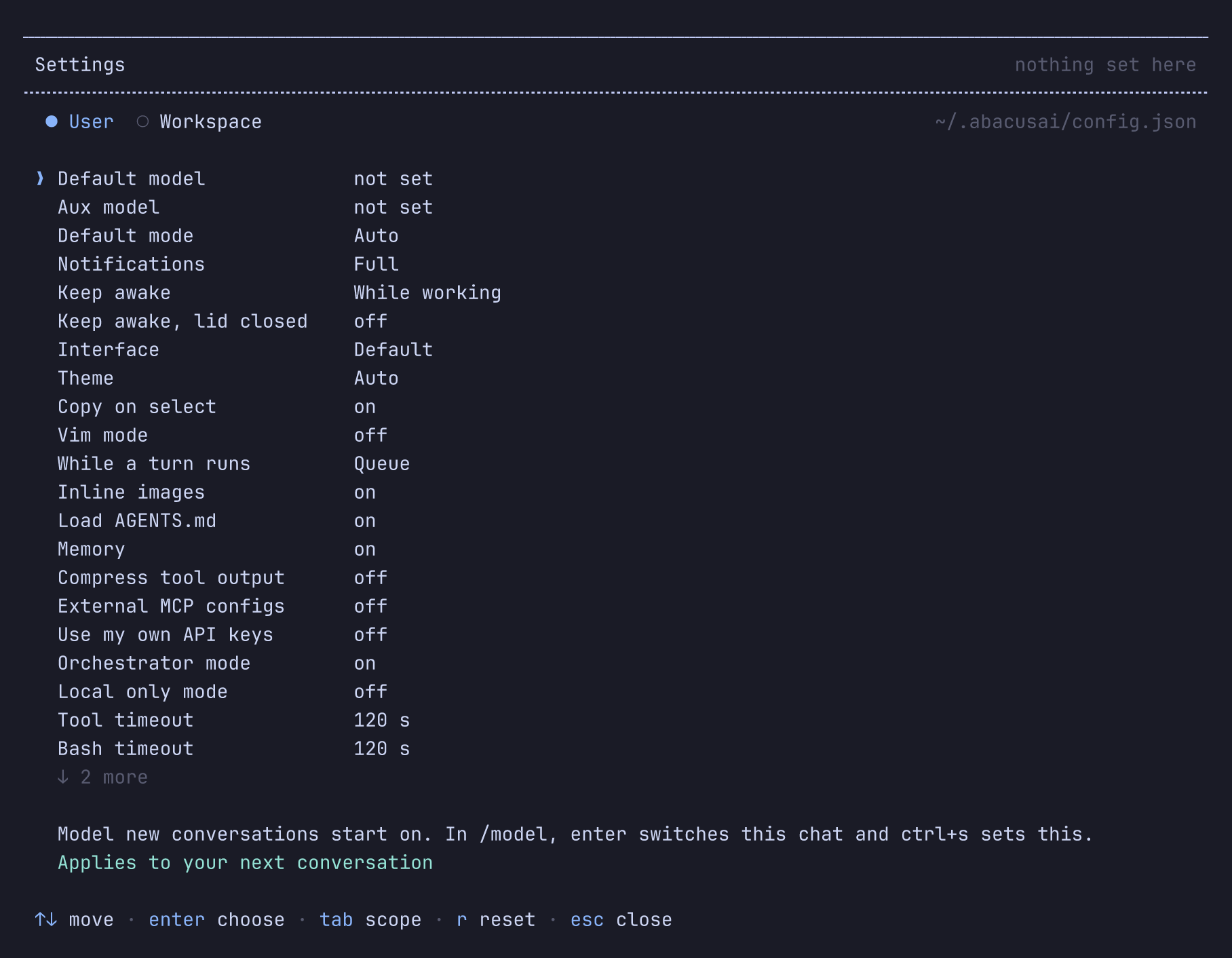
Models and modes
| Key | CLI | VS Code | Default | What it does |
|---|---|---|---|---|
model | Default model | abacusAgent.defaultModel | Abacus.AI default | Model that new conversations start on |
smallModel | Aux model | unset | Titles chats that run on a local provider. Abacus.AI chats are titled by the server. | |
permissionMode | Default mode | abacusAgent.defaultPermissionMode | Auto | Mode a session starts in. See Permission modes. Restart to apply. |
permissions | /permissions | Permission rules | unset | Allow, ask, deny and auto-mode rules, and strictness. See Permissions. |
orchestratorMode | Orchestrator mode | abacusAgent.orchestratorMode | on | Your selected model plans and reviews while a cheaper model implements, to stretch your credits. User scope only. |
useOwnApiKeys | Use my own API keys | abacusAgent.useOwnApiKeys | off | Bill supported Abacus.AI models to your own API key instead of credits. See Providers. |
localOnly | Local only mode | abacusAgent.localOnly | off | Show local models and local chats only. See Providers. |
providers | /providers | Local LLM providers | unset | Your own model providers. See Providers. |
Interface
| Key | CLI | VS Code | Default | What it does |
|---|---|---|---|---|
tui | Interface | default | default draws inline and leaves the transcript in your terminal's scrollback; fullscreen takes the whole screen, answers the mouse, and is the default inside tmux, Zellij and screen | |
theme | Theme | auto | Whether colors are chosen for a dark or a light terminal. Auto asks the terminal. Set it yourself when the terminal reports the wrong one. Restart to apply. | |
tuiCopyOnSelect | Copy on select | on | In the fullscreen interface, copy a mouse selection as soon as the button is released | |
vimMode | Vim mode | off | Edit the composer modally. See Using the CLI. | |
submitWhileRunning | While a turn runs | abacusAgent.submitWhileRunning | queue | What Enter does with a message typed while the agent works: queue it for the next step, or steer the turn now. Ctrl+Enter always does the other. User scope only. |
showImages | Inline images | on | Draw images where they appear, in terminals that support a graphics protocol | |
notifications | Notifications | abacusAgent.notifications | full | How you are told a turn ended while the window is unfocused: full, sound or off. See Turn-end notifications. |
preventSleep | Keep awake | abacusAgent.preventSleep | system | Keep the computer awake while the agent works: system, display (also keeps the screen on) or off |
preventSleepOnLidClose | Keep awake, lid closed | abacusAgent.preventSleepOnLidClose | off | Keep working when the laptop lid closes, where the system allows it (macOS on power, Linux). No effect while Keep awake is off. |
Turn-end notifications
The notification says how the turn ended (finished, failed or paused) and names the conversation, or the project folder while the conversation has no title yet, so several sessions can be told apart. Failed turns play the alert sound and paused ones the waiting tone.
A turn you stopped yourself sends nothing. Focus is read when the notification fires rather than when you sent the message, so leaving the terminal mid-turn gets you one. Both interfaces notify, fullscreen included.
Context and tools
| Key | CLI | VS Code | Default | What it does |
|---|---|---|---|---|
autoLoadAgentsMd | Load AGENTS.md | abacusAgent.autoLoadAgentsMd | on | Send your AGENTS.md files at the start of each conversation |
autoMemoryEnabled | Memory | on | Let the agent keep notes on this repository and read them in later conversations. See Memory. | |
autoMemoryDirectory | unset | Keep those notes somewhere other than the default folder. User scope only. See Memory. | ||
hooks | unset | Your commands to run before and after tool calls, when a prompt is sent and when a turn ends. Hooks from every file run. See Hooks. | ||
disableAllHooks | off | Turn every hook off. See Hooks. | ||
compressToolOutput | Compress tool output | off | Shrink command output and file reads before they reach the model | |
loadExternalMcpConfigs | External MCP configs | abacusAgent.loadExternalMcpConfigs | off | Also discover MCP servers configured in Cursor, VS Code, Claude Desktop and Windsurf. Restart to apply. |
toolTimeoutMs | Tool timeout | 120 s | How long any single tool may run, from 1 to 600 seconds | |
bashToolTimeoutMs | Bash timeout | 120 s | Default timeout for shell commands, from 1 to 600 seconds, overridable per call |
Updates
| Key | CLI | VS Code | Default | What it does |
|---|---|---|---|---|
autoUpdate | Updates | auto | auto installs and relaunches, prompt asks first, off only tells you an update exists. User scope only. | |
updateChannel | Update channel | detected | latest for released versions or canary for the tip of tree. User scope only. |
Permission modes
The mode decides how much the agent asks before it runs a tool that changes something. Sessions start in Auto.
| Mode | --permission-mode | permissionMode value |
|---|---|---|
| Auto | auto | AUTO |
| Supervise | supervise (also default, normal, manual) | DEFAULT |
| Accept edits | accept-edits (also acceptEdits) | ACCEPTEDITS |
| Plan | plan | PLAN |
| Unsupervised | unsupervised (also bypassPermissions, yolo) | YOLO |
| Don't ask | dont-ask (also dontAsk) | DONTASK |
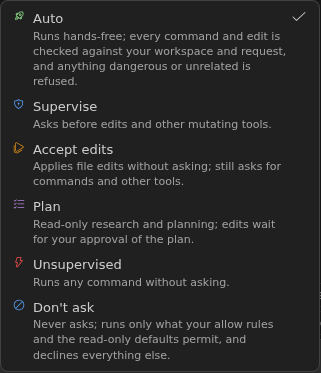
Press Shift+Tab in the CLI or use the mode dropdown in VS Code to switch for the current session. To start in a mode every time, set permissionMode or pass --permission-mode <mode>. What each mode does and how to pick one are covered in Permissions.
Permission rules
Rules decide specific tools before the mode gets a say. They live under permissions in either config.json and are combined across both, with deny beating ask and ask beating allow. Edit them with /permissions in the CLI or Permission rules on the VS Code settings page, both of which have User and Workspace tabs.
{
  "permissions": {
    "allow": ["Bash(git log *)", "Bash(npm test *)"],
    "ask": ["Edit(src/generated/**)"],
    "deny": ["Read(.env)", "Bash(git push *)"]
  }
}
Answering "always allow" on a prompt saves the rule to the workspace .abacusai/config.json. To give your team the same rules, commit that file.
The full syntax, path anchors, MCP and skill rules, command-line rules, and what each prompt answer saves are covered in Permissions.
Files that always ask
Writing a file that configures your machine or a tool (git hooks, shell startup files, package manager plugins, the settings of this agent, Claude Code and Codex) always comes back to you, and no allow rule pre-approves it. The full list is in Permissions.
Workspace trust
A repository's own files can start processes and widen what the agent may do: .abacusai/mcp.json names MCP servers to run, and .abacusai/config.json can set a permission mode, allow rules or extra directories. Opening a repository you have just cloned must not do either, so the first session in such a folder asks you first.
The prompt names the folder, counts what is waiting, and lists each item with what it would do: an MCP server and the command it runs or the URL it reaches, a setting and the value it would take, a skill and the tools it would pre-approve.
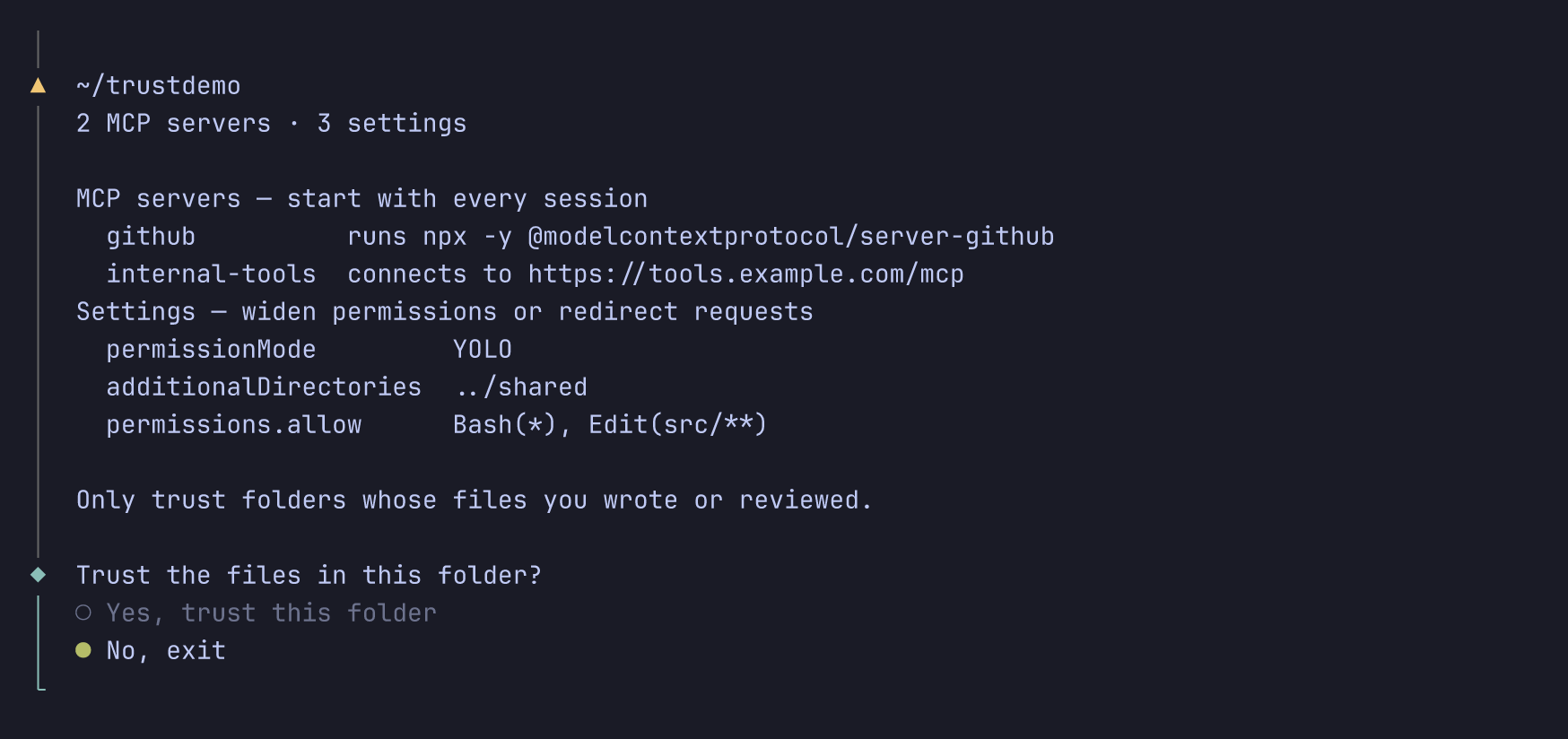
No, exit runs nothing from the folder and you are asked again next time; nothing is recorded. Yes applies to that folder and everything below it. When the list is too long for the screen, a third answer shows the rest before you decide. Nothing is pre-selected for you when the folder would run something. You have to choose "yes" deliberately.
| Only in a trusted workspace | In any workspace |
|---|---|
MCP servers from .abacusai/mcp.json | permissions.deny and permissions.ask, which can only restrict |
permissionMode, permissions.allow, permissions.strictness | Every other project setting |
hooks and disableAllHooks | |
additionalDirectories, additionalMcpConfigPaths, loadExternalMcpConfigs, baseUrl | Project skills themselves (only their allowed-tools is held back) |
Until the folder is trusted, a project skill also cannot shadow a built-in or global skill of the same name. Your own ~/.abacusai files, --settings and --mcp-config files, and command-line flags are yours and are never gated. Running from your home folder there is no project layer at all.
Trusted folders are recorded in ~/.abacusai/trusted-workspaces.json with the date. Delete an entry to be asked again. Your home folder and the filesystem root are never recorded, since trusting either would silently cover every repository below it. They are trusted for the one session only.
# Trust the folder for one run, recording nothing. The switch for CI.
ABACUS_TRUST_WORKSPACE=1 abacusai -p "run the tests"
Print mode never asks. Without trust it runs anyway, without the project's servers and gated settings, and names what it ignored in one stderr warning. See Scripting and CI.
In VS Code the extension follows VS Code's own Workspace Trust instead of asking separately. In Restricted Mode it tells you what is being ignored and offers Show details and Manage Workspace Trust. Trusting the workspace there applies immediately: the project's settings, skills and MCP servers come up without a reload. A session already running still keeps the permission rules it started with.
Environment variables
Environment variables override every file. They are handy in CI and containers.
| Variable | What it sets |
|---|---|
ABACUS_API_KEY | Signs you in without a stored login |
ABACUS_MODEL | The model, same as model |
ABACUS_PERMISSION_MODE | auto, supervise, accept-edits, plan, unsupervised or dont-ask. Claude Code's mode names work too. |
ABACUS_TRUST_WORKSPACE | 1 trusts the current folder for this run only. See Workspace trust. |
ABACUS_AUTO_LOAD_AGENTS_MD | true or false |
ABACUS_DISABLE_AUTO_MEMORY | Turns off the agent's repository notes |
ABACUS_ORCHESTRATOR_MODE | true or false |
ABACUS_AUTO_UPDATE | auto, prompt or off |
ABACUS_TOOL_TIMEOUT_MS | Tool timeout in milliseconds |
ABACUS_BASH_TIMEOUT_MS | Shell command timeout in milliseconds |
ABACUS_BASE_URL | A different Abacus.AI endpoint, same as baseUrl |
API keys for your own providers, such as OPENAI_API_KEY, are covered on the Providers page.
CLI flags
Run abacusai --help for the full list. These flags change settings for one session:
| Flag | Effect |
|---|---|
--model <id>, -m | Model for this session |
--permission-mode <mode> | auto, supervise, accept-edits, plan, unsupervised or dont-ask. Claude Code's mode names work too. See Permission modes. |
--auto-accept-edits | Shorthand for --permission-mode accept-edits |
--dangerously-skip-permissions | Shorthand for --permission-mode unsupervised |
--allowed-tools <rules>, --allowedTools | Add allow rules, comma- or space-separated. Repeat for more. See Rules on the command line. |
--disallowed-tools <rules>, --disallowedTools | Add deny rules, comma- or space-separated. Repeat for more. |
--add-dir <path> | Let the agent work in another directory too. Repeat for more. |
--no-agents-md | Skip AGENTS.md |
--settings <file> | Merge a JSON settings file. Repeat for more. |
--mcp-config <file> | Add an MCP config file. Repeat for more. |
--resume [id], -r | Resume a conversation by id, or pick one from a list |
--continue, -c | Continue the most recent conversation |
--worktree[=<name>], -w | Run in a git worktree under .abacusai/worktrees |
--tmux | Run the worktree session inside tmux. Needs --worktree. |
--debug | Log at debug level and print the log file path |
--print, -p | Print the answer and exit, without the interactive interface. See Scripting and CI. |
The CLI also takes subcommands that run instead of a session:
| Command | What it does |
|---|---|
abacusai auth login|logout|status|switch | Sign in, sign out, show who you are, or switch organization |
abacusai upgrade | Check for updates and install the latest version |
abacusai release-notes | Show the release notes for this version |
abacusai shell-integration | Send commands your shell does not recognize to abacusai -p |
abacusai agent-browser [args] | Run the bundled browser automation CLI |
VS Code settings
A few options only make sense in the editor. Find them in VS Code's settings editor under "Abacus", or click "Open settings" at the bottom of the Abacus Settings page.
| Setting | What it does |
|---|---|
abacus.viewKind | Where the panel opens: primarySidebar, secondarySidebar, editor or window |
abacusAgent.inlineDiffEditor | Show the agent's edits inline in your file with accept and reject buttons, instead of a two-pane diff |
abacusAgent.showStatusBar | Show the Abacus AI indicator in the status bar |
abacusAgent.notifications | Sound and popup, sound only, or off |
abacusAgent.defaultModel | Model for new conversations |
abacusAgent.defaultPermissionMode | Mode new conversations start in |
abacusAgent.submitWhileRunning | Whether Enter queues a message or steers the running turn |
abacusAgent.preventSleep | Keep the computer awake while the agent works |
abacusAgent.preventSleepOnLidClose | Keep working when the laptop lid closes |
abacusAgent.orchestratorMode | Let a cheaper model implement while your model plans and reviews |
abacusAgent.localOnly | Use local providers only |
abacusAgent.baseUrl | Point the extension at a different Abacus.AI endpoint |
Troubleshooting
A setting does not apply
Open /settings and look at the tag on the row. env or override means an environment variable, a --settings file or a flag is winning. workspace while you edited the user file means the workspace file wins. If a setting you put in a project's config.json is ignored entirely, the workspace is probably not trusted yet. See Workspace trust.
A config.json is not being read
Both config.json files parse as JSONC, so comments and trailing commas are fine, as in VS Code's settings.json.
A real syntax error is reported once at startup, naming the file with the line and column. That file is skipped for the session (the other scopes still load), and writes to it are refused, so an always allow or a /model pick cannot overwrite it while it is broken. Fix the spot it named and restart.
Writes touch only the keys that change, so your comments and layout survive a /model pick or a new permission rule.
A change did not take effect
permissionMode, theme and loadExternalMcpConfigs apply the next time you start. The model, the timeouts, autoLoadAgentsMd and autoMemoryEnabled apply to your next conversation. Everything else is live. Each row in /settings says which of the three it is. To change the current session, use /model or Shift+Tab.
For further help, reach out at support@abacus.ai.