Providers
By default the agent runs on Abacus.AI models and uses credits from your plan. Providers give you three other ways to pay for or host the model. Everything else, including tools, permissions, skills and MCP, works the same whichever you pick.
| Option | Where the conversation runs | What you pay with | Setup |
|---|---|---|---|
| Abacus.AI models (default) | Abacus.AI | Credits | None |
| Your own API key for Abacus.AI models | Abacus.AI | Your OpenAI, Anthropic or Google account. No credits. | Turn on "Use my own API keys" and add a key |
| Your ChatGPT subscription | Your machine | Your ChatGPT plan's Codex usage | Sign in to the Codex CLI |
| A local or third-party provider | Your machine | Whatever the provider charges. Ollama is free. | Add the provider in /providers or in VS Code |
The first option only changes who pays. The other two also move the conversation onto your machine, which changes a few things. See What changes when a conversation runs on your machine.
Bring your own key
Abacus.AI keeps running the conversation, but the request carries your API key. The model vendor bills you, and the turn costs no credits. Connectors, web search, conversation history and every other feature keep working.
Turn it on
| Where | How |
|---|---|
| CLI | Run /settings and switch on "Use my own API keys" |
| VS Code | Open Abacus Settings, then switch on "Use my own API keys" in the Agent section |
config.json | "useOwnApiKeys": true |
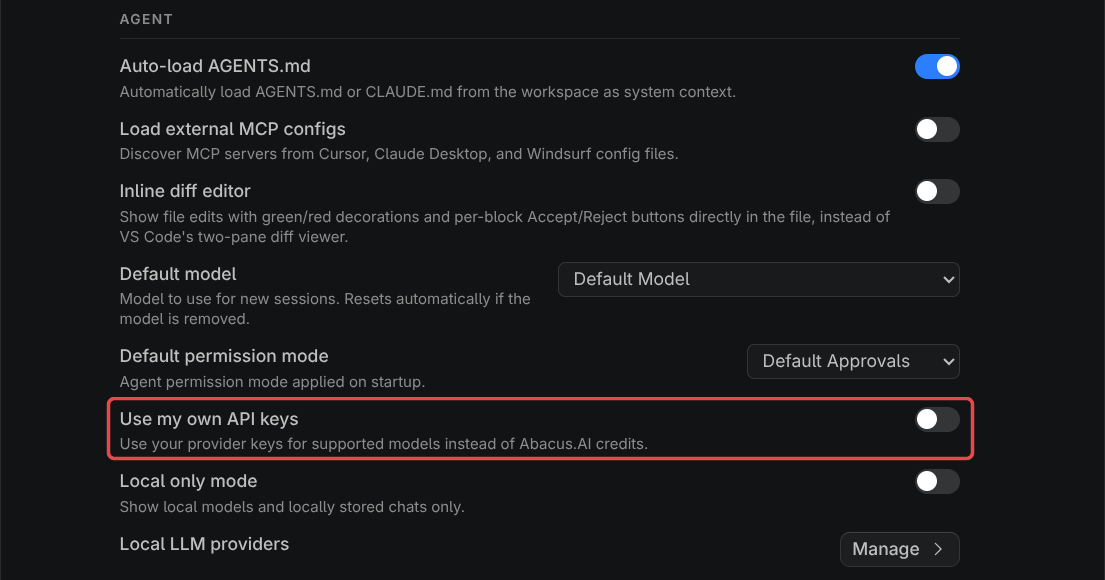
The change applies from your next message.
Add a key
Any of these works:
- Run
/providersin the CLI, or open Local LLM providers in VS Code, and paste the key. - Export the vendor's usual variable in your shell:
OPENAI_API_KEY,ANTHROPIC_API_KEY, orGOOGLE_GENERATIVE_AI_API_KEY(GEMINI_API_KEYalso works).
Keys you paste are stored in your operating system's secure store, such as the macOS Keychain. They are never written to a settings file.
Which models use your key
Open /model in the CLI or the model picker in VS Code. A model that can run on your key shows a "your key" badge once a key is set. A model that could, but has no key yet, says which vendor's key to add.
Two kinds of model always stay on credits: models the Abacus.AI catalogue does not open to user keys, and routers such as RouteLLM, which choose between several vendors. Nothing fails in either case. The turn is simply billed as usual.
A ChatGPT sign-in is not an API key and is never sent to Abacus.AI. To use your subscription, read on.
Bring your own subscription
If you have the OpenAI Codex CLI installed and signed in with your ChatGPT account, the agent lists the Codex models as a provider named codex. Nothing to configure. Conversations on those models run on your machine and count against your ChatGPT plan's Codex limits.
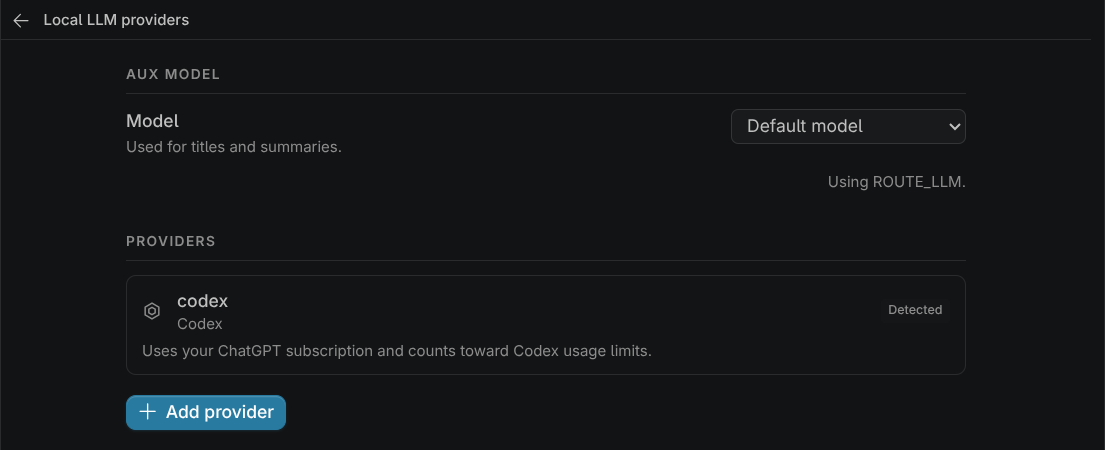
Pick a model with /model in the CLI or the model dropdown in VS Code. Model ids look like codex/gpt-5.4.
Good to know:
- The agent never picks a subscription model for you. You choose it when you start a conversation.
- The picker tells you on the row that turns count against your ChatGPT plan and follow OpenAI's terms.
- Sign out of Codex and the provider disappears from the list.
If Codex is installed but not ready, the row says what to do:
| You see | What to do |
|---|---|
| "Codex is signed out" | Run codex login in your terminal |
| "Your Codex sign-in expired" | Run codex login again |
| "Codex is using an API key" | Add that key as an OpenAI provider instead. See below. |
Local and third-party providers
A provider you add yourself runs the conversation on your machine against any endpoint you choose: Ollama or LM Studio on your laptop, OpenRouter, Groq, DeepSeek, or OpenAI, Anthropic and Google directly. Nothing about the conversation reaches Abacus.AI.
Add a provider in the CLI
Run /providers. Press Tab to choose whether the provider is yours (user) or shared with the project (workspace), then choose "+ add provider".
| Key | Action |
|---|---|
↑ ↓ | Move |
Enter | Edit the selected provider, or add a new one |
t | Test the connection and list the models the endpoint offers |
d twice | Remove the provider and its stored key |
Tab | Switch between user and workspace |
Esc | Close |
The form asks for a type, a base URL, an API key and a name. The name becomes the prefix of the provider's model ids, so a provider named ollama offers models like ollama/qwen3-coder.
Add a provider in VS Code
Open Abacus Settings, find "Local LLM providers" in the Agent section and click Manage. Then click "Add provider".
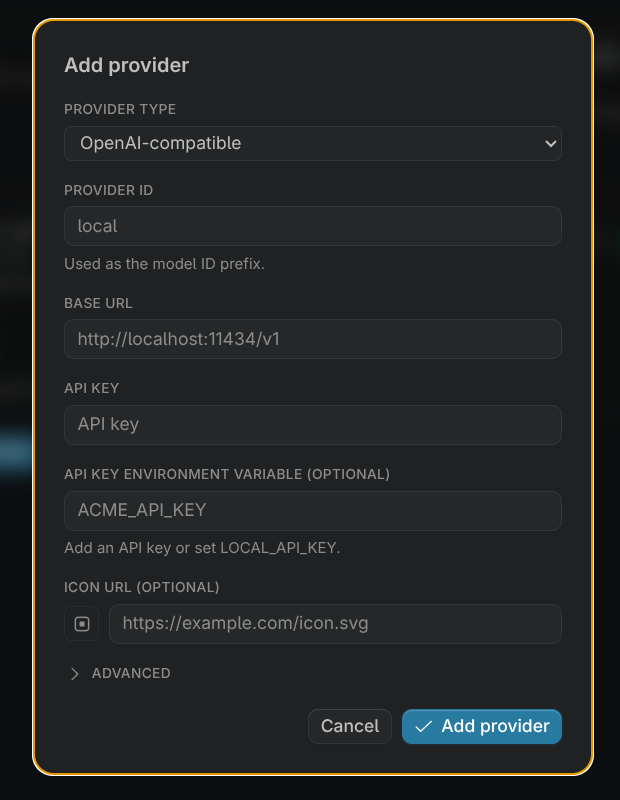
"Test connection" and "Discover models" check the endpoint before you save. The Advanced section holds a manual model list for endpoints that do not publish one, plus options for custom packages. Providers you add here are shared with the CLI.
Provider types
| Type | Use it for | Default endpoint |
|---|---|---|
| OpenAI-compatible | Ollama, LM Studio, vLLM, Groq, Together, OpenRouter, DeepSeek | You supply one, for example http://localhost:11434/v1 for Ollama or http://localhost:1234/v1 for LM Studio |
| OpenAI Responses | api.openai.com directly | https://api.openai.com/v1 |
| Anthropic Messages | api.anthropic.com directly | https://api.anthropic.com/v1 |
| Google Generative AI | Gemini models | https://generativelanguage.googleapis.com/v1beta |
| Custom package | Any provider that has a Vercel AI SDK package, such as Mistral | Set by the package |
The first four are built in. A custom package is downloaded the first time you use it. Azure OpenAI, Bedrock and Vertex have no dedicated type; reach them through an OpenAI-compatible endpoint or a custom package.
Examples
If you prefer editing files, providers live under providers in config.json. The key is the name.
Ollama on your machine, with the model list fetched from the server:
{
  "providers": {
    "ollama": {
      "npm": "@ai-sdk/openai-compatible",
      "format": "openai-compatible",
      "options": { "baseURL": "http://localhost:11434/v1", "name": "ollama" }
    }
  },
  "model": "ollama/qwen3-coder"
}
OpenRouter, reading the key from an environment variable:
{
  "providers": {
    "openrouter": {
      "npm": "@ai-sdk/openai-compatible",
      "format": "openai-compatible",
      "options": { "baseURL": "https://openrouter.ai/api/v1", "name": "openrouter" },
      "apiKeyEnvVar": "OPENROUTER_API_KEY"
    }
  }
}
A custom package with a fixed model list:
{
  "providers": {
    "mistral": {
      "npm": "@ai-sdk/mistral",
      "factory": "createMistral",
      "models": ["mistral-large-latest", "codestral-latest"]
    }
  }
}
| Field | Meaning |
|---|---|
npm | The provider package. Required. |
format | One of openai-compatible, openai-responses, anthropic-messages, google-generative-ai |
options | Passed to the provider: baseURL, name, headers |
models | Model ids, for endpoints that do not publish a list |
apiKeyEnvVar | Name of the environment variable that holds the key |
factory | For custom packages, the function that creates the provider |
providerOptions | Per-request options such as { "openai": { "reasoningEffort": "high" } } |
Keys from your environment
If OPENAI_API_KEY, ANTHROPIC_API_KEY or a Google key is set in your shell, the matching provider appears automatically, marked env. Press Enter on it in /providers to keep it in config.json, or unset the variable to remove it. Set "envProvidersEnabled": false in config.json if you would rather add providers yourself.
Choose a model
Model ids are provider/model, for example ollama/qwen3-coder. Pick one with /model, set it as your default in /settings, or choose it in VS Code. Switching between a local model and an Abacus.AI model starts a new conversation, because the two are stored in different places. The picker marks those rows "new chat only".
What changes when a conversation runs on your machine
Conversations on a subscription model or on a provider you added yourself stay on your machine, and that has trade-offs.
You get:
- Every MCP tool available to the model individually, with no limit on the count.
- Token counts per conversation.
- Transcripts that never leave your machine.
You give up, because these run on Abacus.AI:
- Connectors, the sign-ins to services such as Google Drive and Jira.
- The built-in web search and page reader.
- Conversation history in the web app and on your other devices.
- Regenerating a response for comparison, and feedback on a response.
Local only mode
Turn on "Local only mode" in /settings or in the Agent section of the VS Code settings to hide Abacus.AI models and conversations. The pickers then show only the providers on your machine and the chats stored there. Everything else, including sign-in and updates, keeps working. Turn it off to get the Abacus.AI models back.
Troubleshooting
A provider shows no models
The endpoint did not answer a model list request, or the provider is a custom package. Press t in /providers or "Discover models" in VS Code to see the error. Add a models list to the provider if the endpoint has none.
A model still uses credits with "Use my own API keys" on
Open /model. If the row has no "your key" badge, the model is not open to user keys, it is a router, or no key is set for its vendor. The row's description names the missing key.
Codex is not listed
Run codex login and check that it completes. The list refreshes on its own. If you set "localProvidersEnabled": false in config.json, no provider on your machine is listed at all.
For further help, reach out at support@abacus.ai.