Permissions
The agent asks before it runs a tool that changes something. What it asks about depends on three things: your rules, which allow, ask about or deny specific tools, commands, files and MCP tools; built-in protections for files that configure your machine; and the mode, which decides whatever no rule settles.
Each tool call is checked in this order, and the first step that answers wins:
| Step | Result |
|---|---|
A deny rule matches | Refused, in every mode |
An ask rule matches | You are asked, in every mode except Don't ask, which declines the call |
| A protected file or a critical removal | Allow rules do not apply. See Built-in protections. |
An allow rule matches | Runs without asking |
A read-only command such as ls or git status | Runs without asking |
| Nothing matched | The mode decides |
Rules are checked on your machine. Tools the Abacus.AI server runs itself, such as web fetch, web search and starting a subagent, are not checked against them. The tool calls a subagent makes on your machine are.
Permission modes
| Mode | What happens | --permission-mode |
|---|---|---|
| Auto | The default. Runs without asking, but each command and edit is checked against your workspace and your request, and anything dangerous or unrelated is refused. | auto |
| Supervise | Asks before edits, commands and other tools that change things | supervise |
| Accept edits | Applies file edits and writes inside the workspace without asking. Still asks for commands, deletes and other tools. | accept-edits |
| Plan | Researches and plans without changing anything. Edits wait until you approve the plan. | plan |
| Unsupervised | Runs everything without asking | unsupervised |
| Don't ask | Never asks. Runs what your allow rules and the read-only defaults permit, and declines everything else. | dont-ask |
Claude Code's mode names (default, acceptEdits, plan, dontAsk, bypassPermissions) work wherever a mode is named. Supervise used to be called Normal, and normal still works.
Deny and ask rules apply in every mode. No mode runs something a deny rule forbids, and an ask rule prompts even in Auto and Unsupervised.
Pick a mode
| Where | How |
|---|---|
| CLI, during a session | Shift+Tab cycles Auto, Supervise, Accept edits and Plan. Pressing it once more offers Unsupervised, which needs a second press to confirm. /mode <name> switches to any mode, Don't ask included. |
| VS Code, during a session | The mode dropdown next to the send button |
| Starting the CLI | --permission-mode <mode>. --dangerously-skip-permissions is short for Unsupervised. |
| Every session | permissionMode in a settings file, the ABACUS_PERMISSION_MODE environment variable, or abacusAgent.defaultPermissionMode in VS Code |
Auto mode
In Auto mode each command or edit is judged against the folders the session may work in and against what you asked for. Anything it allows runs without a prompt. Anything dangerous or unrelated to your request is refused, and the agent is told why, so it asks you instead of retrying.
You can steer that judgement in plain language with the Auto mode list in /permissions, for example "Pushing to feature branches is fine without asking" or "Never run git push". These instructions are saved as permissions.autoModeInstructions. They can relax confirmations or forbid things, but they cannot authorize dangerous actions. /permissions also lists the calls Auto mode refused recently.
Don't ask mode
Don't ask is for CI jobs and locked-down runs where everything the agent may do is listed in advance. Allow rules and read-only commands run. Anything that would have prompted is declined, including calls matched by an ask rule and questions to you. A PermissionRequest hook can still approve a call.
abacusai -p "update the changelog" \
  --permission-mode dont-ask \
  --allowed-tools 'Bash(git log *),Edit(CHANGELOG.md)'
Permission rules
Rules live under permissions in any settings file:
{
  "permissions": {
    "allow": ["Bash(git log *)", "Bash(npm test *)", "Read"],
    "ask": ["Edit(src/generated/**)"],
    "deny": ["Read(.env)", "Bash(rm -rf *)", "mcp__github__delete_repo"]
  }
}
Rules from your user file, the project's .abacusai/config.json, --settings files and the command line are combined, not replaced. Deny beats ask and ask beats allow, whichever file each rule came from.
A project's allow rules count only once you trust the folder. Its deny and ask rules apply right away.
Edit rules
In the CLI, run /permissions. It has Deny, Ask, Allow and Auto mode lists, and Tab switches between your user file (~/.abacusai/config.json) and the project file (<project>/.abacusai/config.json).
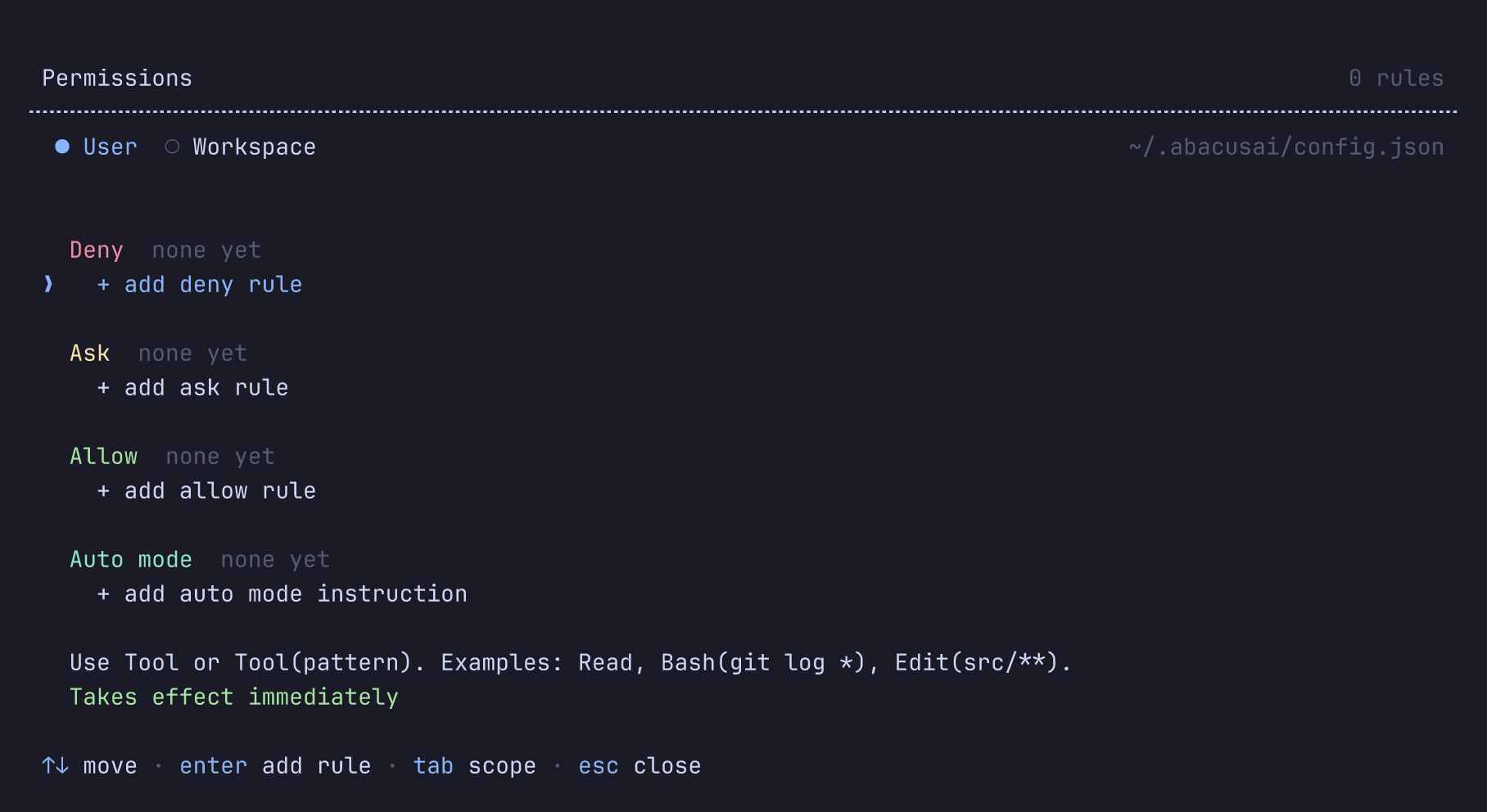
In VS Code, open Abacus Settings and go to Permission rules. It has the same lists and tabs.
A change applies to running sessions from their next tool call.
Rule syntax
A rule is a tool name, optionally followed by a pattern in parentheses. The syntax is Claude Code's.
| Rule | Matches |
|---|---|
Bash or Bash(*) | Every shell command |
Bash(git log *) | Commands that start with git log, and git log on its own |
Bash(npm run test:*) | The same as Bash(npm run test *) |
Read(.env), Edit(src/**) | File paths, with gitignore-style wildcards. See Path rules. |
Delete(tmp/*), Grep(src/**), Glob(src/**) | The other tools that act on a path |
mcp__github | Every tool of the github MCP server |
mcp__github__create_issue | One MCP tool |
mcp__github__get_* | That server's tools whose names match |
Skill(deploy) | In a deny list, hides the skill. See Skills. |
Tool names follow Claude Code's: Bash, Read, Edit, Write, Grep and Glob, plus Delete for this agent's delete tool. An Edit rule also covers Write, and a deny or ask Edit rule with a path also covers Delete.
A deny rule that names a whole MCP server or tool, such as mcp__slack or mcp__slack__post, removes those tools from what the agent is offered, so it never tries them.
Path rules
| Pattern | Anchored at |
|---|---|
//path | The filesystem root: Read(//etc/**) is /etc/** |
~/path | Your home folder |
/path, ./path or path | The workspace root |
* matches within one folder and ** crosses folders, so Edit(*) means files directly in the workspace root. src/**/*.ts matches src/a.ts and src/a/b.ts.
A deny or ask rule that names a bare file or folder applies at any depth, so Read(.env) also covers config/.env. Allow rules stay where you put them: Edit(src/**) allows the workspace's src folder only.
Paths are resolved before they are matched, so Edit(src/**) does not allow src/../../etc/hosts, and a symlink to a denied file is denied.
A Read deny rule also blocks editing, searching and shell commands that read the file, such as cat .env.
Shell commands
A command line is split at |, &&, || and ;, and each part is checked on its own. git status && rm -rf build still asks even with Bash(git status *) allowed. Wrappers such as sudo, env, timeout and xargs are looked through, so a deny or ask rule on the real command still applies. Allow rules match only the command as written.
An allow rule only approves commands whose text is fixed. A part that uses command substitution, a variable such as $HOME, eval or an interpreter's -c is never approved by an allow rule, so it asks even if a rule seems to match it. Deny and ask rules still apply to it.
A redirect to a file is checked as a write. Bash(npm test *) allows npm test but not npm test > /etc/hosts.
Read-only commands such as ls, cat, grep, git status, git log and git diff run without asking when no rule matches.
To let read-only commands with a variable in their arguments, such as ls $HOME, run without asking, set permissions.strictness to lenient. The default, strict, asks for them.
Rules on the command line
For one CLI session, --allowed-tools adds allow rules and --disallowed-tools adds deny rules. Claude Code's spellings --allowedTools and --disallowedTools work too.
abacusai --allowed-tools "Bash(git log *),Read" --disallowed-tools 'Bash(git push *)'
Separate rules with commas, or repeat the flag. --disallowed-tools holds in Unsupervised mode too.
Built-in protections
Files that always ask
Some files decide what runs on your machine without being source code: git hooks and config, editor task runners, shell startup files, package manager config, and the settings of this agent and other coding agents. Writing one always comes back to you, except in Unsupervised mode. Supervise, Plan and Accept edits ask, Auto refuses, and Don't ask declines. No allow rule approves it, so Edit(**) does not cover .git/hooks/pre-commit.
| Protected | Examples |
|---|---|
| Folders, at any depth | .git, .vscode, .idea, .husky, .devcontainer, .abacusai, .claude, .codex, .agents |
| Files | .gitconfig, .gitmodules, .bashrc, .zshrc, .profile, .envrc, .npmrc, .yarnrc.yml, bunfig.toml, .pre-commit-config.yaml, lefthook.yml, .mcp.json, .claude.json |
The agent's own working folders under .abacusai, such as plans and checkpoints, are not protected. Shell commands that write a protected file, such as echo x >> .git/hooks/pre-commit, are caught too.
Removing a critical folder
Removing the filesystem root, a top-level system folder, your home folder, or the workspace or one of its parents asks in every mode, Unsupervised included. Auto refuses it and Don't ask declines it. No allow rule, hook allow decision or "always allow" answer approves it. A PermissionRequest hook can answer the prompt, except in Don't ask mode. This covers the delete tool and commands such as rm -rf ~, rm -rf ../* and find . -delete.
Project files that link outside the project
The agent never saves a project file, such as .abacusai/config.json or .abacusai/mcp.json, through a symbolic link that leads outside the project. Replace the link with a real file to save project settings there.
Answering a prompt
| Answer | Reach | Saved |
|---|---|---|
| Yes | This call only | No |
| "Allow all edits during this session" (Supervise, on an edit prompt) | Switches the session to Accept edits | No |
"Yes, and allow edits in <folder> for this session" (an edit outside the workspace) | That folder, for this session | No |
"Yes, and always allow <rule>" (a command, MCP tool or path tool) | Every later call the rule matches, in every conversation in this folder | To the project's .abacusai/config.json |
| No | This call only | No |
The offered rule is as narrow as the call allows, such as Bash(npm test *) for a command. No rule is offered for writing a protected file or for a critical removal.
A saved rule shows up in the project tab of /permissions, where you can remove it. When the agent creates .abacusai/config.json to save an answer, it also creates .abacusai/.gitignore listing it, so your answers stay out of commits. To share the rules with your team, remove that line and commit the file.
When a plan is ready, approving it offers three ways to continue: approve each edit, auto-accept edits, or full permissions. These switch the session to Supervise, Accept edits or Unsupervised.
Hooks and skills
A PermissionRequest hook can answer a prompt for you, and can add or remove rules and change the mode. See the Hooks reference.
A skill's allowed-tools approves those tools for the turn when you invoke the skill with /name. Deny and ask rules still win, and a project skill grants nothing until you trust the folder.
Coming from Claude Code
The rule syntax, the mode names and the --permission-mode, --allowedTools, --disallowedTools and --dangerously-skip-permissions flags are Claude Code's. Run /import in the CLI to copy your Claude Code permission rules, default mode and additional directories (/import --dry-run to preview):
| From | To |
|---|---|
.claude/settings.json and .claude/settings.local.json | .abacusai/config.json |
~/.claude/settings.json | ~/.abacusai/config.json |
Rules for tools the server runs (WebFetch, WebSearch, Task, Agent) and for tools that do not exist here are skipped, and the report lists them.
| Claude Code | Here |
|---|---|
A shared .claude/settings.json and a personal .claude/settings.local.json | One project file, .abacusai/config.json |
Accept edits also approves filesystem commands such as mkdir and mv | Accept edits approves file edits and writes only |
WebFetch and Agent rules control those tools | The server runs those tools, so the rules have no effect |
A bare deny such as Bash removes the tool | A bare deny of a built-in tool blocks each call. Bare denies of MCP tools and skills do remove them. |
/path is anchored at the settings file's source, such as ~/.claude/ for user settings | /path is always the workspace root. /import rewrites user-file rules to keep their meaning. |
| Managed settings for an organization | Not available |
Source: Claude Code's Configure permissions.
For further help, reach out at support@abacus.ai.